CIT OMS briefing
Opening · 1 / 1

Management & colleague briefing

CIT Operational Management System

One clear picture. Better-timed work.

A practical office system that brings the contract register, inspection obligations, monthly planning and follow-through into one explainable workflow.

01Contract registerOne structured record with history.
02Inspection planningWindows, ERI, roster and workload together.
03Follow-throughPublished plan, conducted fact and outstanding work.

Prepared from: the current repository, source-of-truth documents, QAS Circular 1/2019 (Dec 2025 version), local reference workbooks, current database aggregates and the attached implementation plan. Operational names are not shown.

A careful promise

What this briefing is—and is not

It is

  • A plain-language explanation of the whole CIT OMS concept.
  • A walkthrough of the real current interface using carefully fabricated records.
  • A management view of benefits, controls, limitations and next decisions.
  • A bridge between Circular obligations and daily office work.

It is not

  • A claim that software replaces professional judgement.
  • A guarantee that every Circular case is automatically compliant.
  • A production security certification or a completed multi-user deployment.
  • A proposal to digitise every complaints, DN/DP or questionnaire workflow now.
The practical promise: the system calculates, ranks, validates, warns, proposes and records. EO reviews, adjusts, approves and publishes.

Source: Project Charter; System Architecture; MVP Scope; Decisions Log; AGENTS.md current milestone.

The idea in one sentence

Turn contract facts into a clear, reviewable chain of work.

1

Register

Keep the contract, dates, workforce, districts, offices and extension history together.

2

Work out what is due

Calculate First, Annual and Final AI windows, sample size and ERI eligibility.

3

Plan the month

Combine suitable visits with ERI choices, district bundles and the staff roster.

4

Record what happened

Confirm the physical visit, actual date, HI, audit month, ERI and irregularity.

5

Follow up

See outstanding visits, GA work, exceptions and what needs attention next.

Requirement → Plan → Conducted fact. Keeping these three ideas separate is the foundation of an honest operational record.

Source: Current Workflow; System Architecture; Data Model; Inspection-record and monthly-scheduling rules.

01

Why it matters

The scale is already beyond a simple list.

The office is managing hundreds of contracts, thousands of workers, changing expiry dates, multiple districts and recurring inspection windows—with a small specialist team.

Figures in the next slides are read-only aggregates checked against the attached plan.

Verified snapshot · 1 August 2026

The operational picture at a glance

441contracts in the registry
275active contracts
11,613active non-skilled workforce recorded
75distinct contractors with active contracts

Active procurement mix

241 Tender · 34 Quotation

One shared contract model; procurement method is a value, not a separate database.

Definition of active

Commenced and not yet expired

Commencement ≤ snapshot date ≤ current expiry date.

Why this matters: no single officer should have to remember this estate in their head, and no monthly schedule should depend on one spreadsheet cell being interpreted perfectly.

Evidence: read-only aggregate queries on the local registry; figures reconcile to the attached implementation plan.

Active portfolio

The workload is not evenly shaped

Public cleansing (Type A)
8,795
Pest control (C)
855
Market management (M)
716
Security (F)
433
Market / hawker cleansing (B)
371
Cemeteries & crematoria (D)
250
Building cleansing (E)
179
Other + vehicle washing (O + H)
14

Inside Type A

Street cleansing dominates

63 active street-cleansing contracts account for 8,417 recorded workers. Waste collection has 17 contracts / 115 workers; coastal cleansing 2 / 87; other Type A 12 / 176.

A crucial modelling point

36 additional active contracts have workforce 0

They remain in the registry, but the current rules do not make them subject to AI, ERI or GA. A blank workforce is different: it stays eligible until clarified.

Evidence: active-contract service-code/subtype and workforce aggregates from the local registry. Groupings follow Note 1 service classifications.

People & place

A small team, a territory-wide responsibility

CWCentral & Western
WchWan Chai
EEastern
SSouthern
YTYau Tsim
MKMong Kok
SSPSham Shui Po
KCKowloon City
WTSWong Tai Sin
KTKwun Tong
TWTsuen Wan
TMTuen Mun
YLYuen Long
NNorth
TPTai Po
SKSai Kung
STSha Tin
KwTKwai Tsing
IsIslands

The database can also hold HQ / specialist unit labels without pretending they are geographic districts.

1SHI
4HIs
1EO(CIT)
1MD

The CIT establishment

CIT consists of one SHI, four HIs, one EO(CIT) and one MD. GA work is assigned to HIs. The OMS also permits EO(CIT) assignment only for an administrative arrangement—not as the normal GA allocation.

The management question: how can this small team see what is due, what is urgent, who is available and what has actually happened—without relying on memory?

Source: QAS Circular 1/2019 and the confirmed CIT establishment; Roster and GA rules; current staff configuration.

The starting point

The current workflow has grown in separate islands

Source records

Tender master, quotations and CMS Excel files

Different layouts, headings and update cycles. Valuable source material, but not one relational record.

Human reconciliation

Copy, interpret, remember and cross-check

Expiry changes, proposed/conducted dates, ERI history, districts and staffing have to be brought together for each month.

Monthly outputs

Schedule, covers, records and outstanding reports

A polished spreadsheet can show the month, but it cannot by itself preserve every relationship and historical fact.

Repeated typing

The same contract facts may appear in several worksheets and reports.

Hidden meaning

Several dates or status tokens may live inside one wrapped cell.

Person-dependent knowledge

Rules and exceptions can become inseparable from individual experience.

Source: Current Workflow; Migration Plan; reference Tender Master, Quotations and CIT Schedule workbook structures.

02

The foundation

One contract record, with rules around it—not rules hidden inside it.

The system is designed to store factual source data, preserve history and calculate what can safely be derived.

This is the core of the data model and architecture.

Data model in plain language

The contract is the centre of the system

Districts

One or many, held as proper relationships—not comma-separated text.

Recipient offices

Primary and additional offices, separately structured.

Expiry extensions

Previous expiry, new expiry, notice date and reason are preserved.

AI requirements

Calculated windows linked back to the contract.

Inspection facts

Actual visits, HI, district, ERI and requirement links.

Plans and work queues

Monthly schedules, GA, imports and outstanding work.

Tender and Quotation are values in the same model. They are different procurement methods, not different universes of data.

Source: Data Model; Project Charter; migrations 001–021; contract domain.

The most important distinction

Requirement, plan and fact are different truths

Calculated
Requirement

“This contract has a Final AI window from April to June.” It exists because of the contract term and rules.

It does not mean a visit was booked.

EO-approved
Plan

“We intend to visit on 5 June, in KC, with HI-9, as AI+ERI.” It is a scheduling decision.

Publish freezes this intention only.

Recorded
Conducted fact

“The visit actually happened on 5 June and HI-9 recorded it.” This belongs in inspection history.

Only this proves the visit occurred.

Why it matters: if Publish created inspection history, the record would say a physical visit happened before anyone confirmed it.

Source: Architecture and Data Model principles; v1.1/v1.2 inspection-record decisions.

Architecture without the jargon

A simple, maintainable technical shape

People use

A normal web browser

Clear forms, readable tables and obvious actions. The browser never opens the database file directly.

The application handles

Rules, validation and workflow

It calculates obligations, checks input, builds the monthly proposal and controls every database write.

The office stores

A structured SQLite database

One nominated local file for the prototype/pilot, with migrations and foreign-key relationships.

Current stack

TypeScript, Express, EJS and SQLite.

Portability

Database access is isolated so a later database change remains possible.

Deliberate restraint

No unnecessary enterprise framework for the prototype.

Source: System Architecture; package configuration; database connection and migration code.

A record you can explain later

History is preserved instead of overwritten

Example

Expiry extension

Previous expiry30 Jun 2025
New expiry30 Jun 2026

The previous date is kept in extension history; current expiry advances; AI requirements are recalculated.

Result: the system can explain why an Additional Final AI exists after an extension.

Source trail

“Added in this system,” “updated from CMS Excel,” or “expiry extended” can be shown against the contract.

Conducted history

Removing a newly recorded visit does not silently rewrite imported Excel history.

No silent legacy guesses

Unresolved tokens become review items; they are not quietly interpreted as facts.

Source: Contract/extension rules; Migration Plan; source-event and inspection-history logic.

03

AI and ERI obligations

Make the rules visible, explainable and reviewable.

The system converts contract dates and workforce facts into proposed obligation windows—without pretending that every edge case can be decided by a machine.

Circular rules are supplemented by approved office planning decisions recorded in the Decisions Log.

Eligibility first

First decide whether the contract is subject

Start with factual inputs

Term length + non-skilled workforce

These two facts drive the first branch before the system calculates any monthly obligation.

Workforce = 0

Keep the contract in the registry, but no AI, ERI or GA is due.

Workforce is blank

Do not assume zero. The contract stays eligible until the source fact is clarified.

Term is under 12 months

One First AI only. No Annual or Final AI, no GA, and no ERI.

Term is 12 months or more

Calculate First, Annual and Final obligations; ERI and GA rules may apply.

Exact 12-month boundary: the expiry must reach the calendar anniversary. Expiring the day before is still under 12 months.

Source: AI Obligation Rules; Decisions D-086 and D-062; AI and GA engine tests.

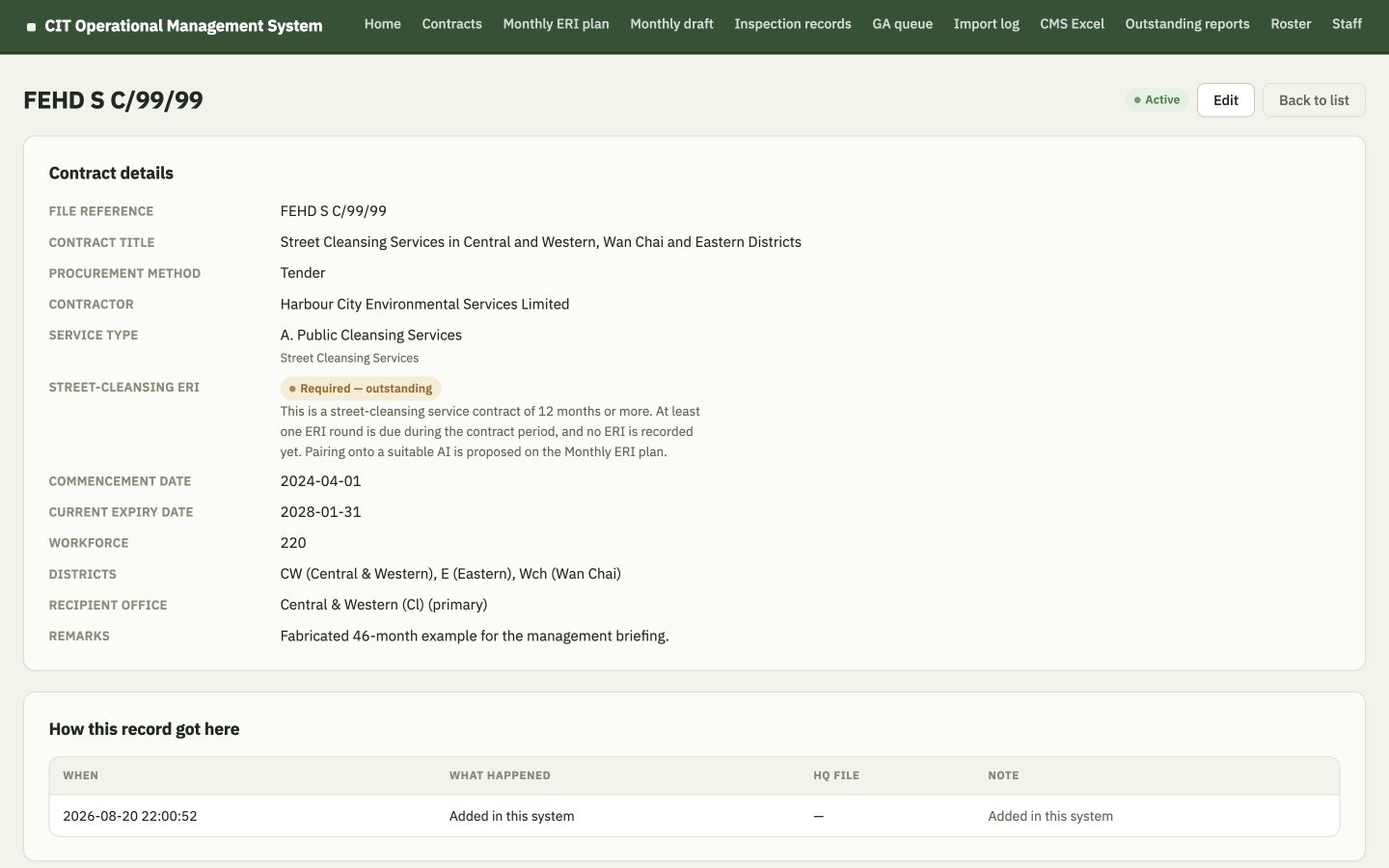
A complete worked example

A 46-month contract shows the full AI sequence

Fabricated example: FEHD S C/99/99 runs from 1 April 2024 to 31 January 2028—46 calendar months. The dates below are calculated from those two factual dates.
F

First AI

Apr–Jun 2024
Preferred: May–Jun

A1

Annual 1

Feb–Jun 2025
Anniversary month: Apr

A2

Annual 2

Feb–Jun 2026
Anniversary month: Apr

A3

Annual 3

Feb–Jun 2027
Anniversary month: Apr

F

Final AI

Nov 2027–Jan 2028
Preferred: Nov

The useful pattern: First opens the contract, Annual repeats around each anniversary, and Final closes the term with time left for follow-up.

Source: QAS Circular 1/2019; AI Obligation Rules; Decisions D-054; AI engine.

Avoiding duplicate physical visits

One visit can satisfy overlapping Annual and Final duties

What the model keeps

AnnualRequirement existsMarked as overlapping Final
+
FinalVisitable jobAppears on the monthly list

The Annual fact is preserved for explainability, but it is not offered as a second standalone visit.

Why this is better

  • No duplicate physical inspection for the same time period.
  • No obligation disappears from the historical model.
  • One conducted inspection can link to both relevant requirements.
Extension case: if expiry moves later, the old Final remains historical and the system may create an Additional Final for the new end date.

Source: AI Obligation Rules; Data Model; requirement-link logic; Decisions on overlapped Annual and Additional Final.

A simple example of useful automation

The Circular interview sample becomes a visible calculation

Non-skilled workforceStaff to interview
1–5All
6–505
51–10010
101–15015
More than 15020

Example

Workforce 220 → sample 20

The number is shown beside the contract and carried into schedule/report outputs.

Important edge cases

0 means not subject. Blank means the fact is not known and remains eligible for planning.

Management value: a repeatable calculation is done once, consistently, and remains visible to the user.

Source: QAS Circular 1/2019 sample bands; AI engine and registry tests.

ERI principle

ERI is part of an AI visit—not another physical visit

AI windowChoose a suitable visitFirst, Annual, Final or Additional Final
+
ERI componentTick “Send”When the selected AI should also include ERI
=
One visitAI + ERIOne district-day, one conducted inspection fact

Monthly minimum

Aim for at least 8 ERIs. The system counts and warns; it does not silently tick eight.

Street cleansing

One ERI round over a 12-month-or-longer contract term. It need not happen every year.

Short contracts

Under 12 months: ERI is blocked, even if the user tries to tick it.

Source: ERI Selection Rules; QAS Circular; Decisions D-061/D-062.

How the monthly list is built

The monthly ERI list is a decision-support list

Section A

Outstanding street-cleansing contracts

Contracts of 12 months or more with no recorded ERI are brought forward and sorted mainly by sooner expiry.

Section B

Other suitable AI windows

Default order: sooner expiry, then Pest Control → Market → Security → Coastal → Waste → other; prior ERI history and sample size help break ties.

Locked safeguard

Last full calendar month of term

If an eligible street-cleansing contract is still outstanding, it becomes locked AI+ERI. If its Final was already conducted, an Extra AI+ERI can be created for this purpose.

Membership windows

  • First: preferred months 2–3.
  • Annual: the full preferred ±2-month window.
  • Final: all three Circular months ending at expiry.
Still a human choice: ordinary candidates are not auto-selected. EO can sort Section B and decide which visits should carry ERI.

Source: ERI Selection Rules; Monthly Scheduling Rules; ERI pairing engine.

04

Monthly planning

Turn policy and availability into an explainable first draft.

The schedule is intentionally a transparent greedy proposal—not an opaque “optimal” answer and not a constraint solver.

EO can review, move, reassign, take off, add, save and publish.

Roster logic

A routine morning needs the right combination of people

✓ Available

Available is the default; it does not need a stored row.

✕ Other Duty

Not available for that half-day.

Other roster codes

VL · A · T · MA · M, for vacation leave, appointment, training, medical appointment and meeting.

Plain result: the calendar tells the scheduler which mornings are suitable and why another morning is not.

Source: Roster Rules; roster domain and migration holiday calendar.

Explainable greedy engine

How the draft proposal is made

1

Take the month’s list

Use selected AI+ERI rows plus last-chance visits and locked street-cleansing safeguards.

2

Choose a visit district

Single-district contracts are clear; EO chooses one for a multi-district contract.

3

Build district bundles

A tick opens a district bundle; other suitable jobs for that same visit district can travel with it.

4

Match day capacity

Prefer a day whose free HIs fit the remaining bundle size: 4, 3, 2 or 1.

5

Share the work

Prefer an HI with no job that day, then the lowest month-to-date workload points.

Workload points: AI = 1 point; AI+ERI = 2 points. The points guide a fair spread and remain visible to EO.

Source: Monthly Scheduling Rules, especially D-059/D-064; monthlyDraft engine.

D-059 in plain language

Capacity matching keeps the first draft practical

4-HI day

Best for a large district bundle.

3-HI day

Prefer for a three-job bundle.

2-HI day

Prefer for a paired bundle.

1-HI day

Good for a single visit.

One district per physical day

The automatic draft keeps each day geographically coherent.

One preferred job per HI

The engine does not auto-double. EO can still decide two visits are acceptable.

Remainder stays visible

Anything that cannot be placed appears as “Not placed yet,” with a reason.

Last chance first: when work competes for limited capacity, expiring and final-window needs are considered before mid-window jobs.

Source: Monthly Scheduling Rules; scheduling engine and tests.

Decision support, not autonomy

The system proposes; EO controls the month

EO can change the proposal

  • Drag or click a visit onto another date.
  • Choose another available HI.
  • Take a visit off the calendar.
  • Place a waiting visit by hand.
  • Recalculate while preserving deliberate hand-added visits.

Publish freezes the plan

Recalculate, drag, take-off and reassignment are no longer available until the month is unpublished—if Unpublish is still allowed.

Hard warnings: weekend/holiday, mixed districts, assigned HI unavailable, MD unavailable, locked AI+ERI missing, or ERI wrongly attached to a short contract.
Soft warnings: uneven workload points, outstanding street-cleansing waiting, multi-district limitations and similar review cues.

Warn—and sometimes allow

Publish warns about last-chance leftovers but does not silently block management judgement. The warning remains visible and the leftover stays on “Not placed yet.”

Source: Monthly Scheduling Rules; Decisions D-041, D-046, D-067, D-068 and D-085.

05

Product tour

What colleagues actually see and do.

Every screen shown next uses the current application and carefully fabricated, office-style demonstration records. No private office record is pictured.

Screens captured from the current repository build on 20 August 2026.

Product tour · Home

Home turns many work queues into one starting point
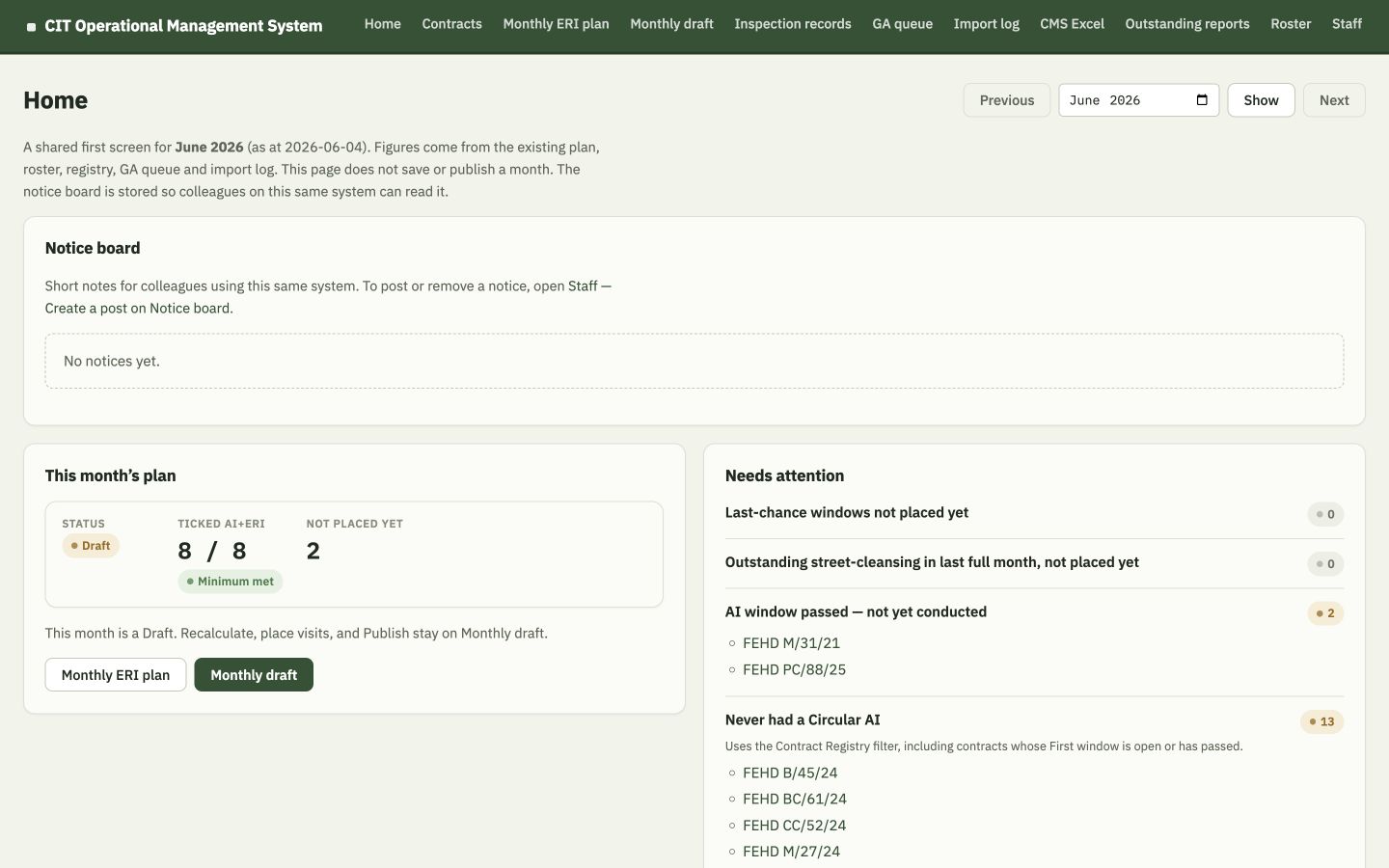
Fabricated CIT OMS Home screen showing a Draft month, eight ERI ticks and needs-attention counts
Draft month: status, ERI minimum, leftovers and attention items appear together.

This month’s plan

Draft / Published, ERI count, minimum status and “Not placed yet.”

Needs attention

Last-chance windows, locked street-cleansing, passed windows, GA and import exceptions.

Read-only shared view

Home assembles facts; it does not secretly save or recalculate a month.

Current UI: Home page and home aggregation engine; temporary fabricated database.

Product tour · Contract Registry

The registry makes the estate searchable
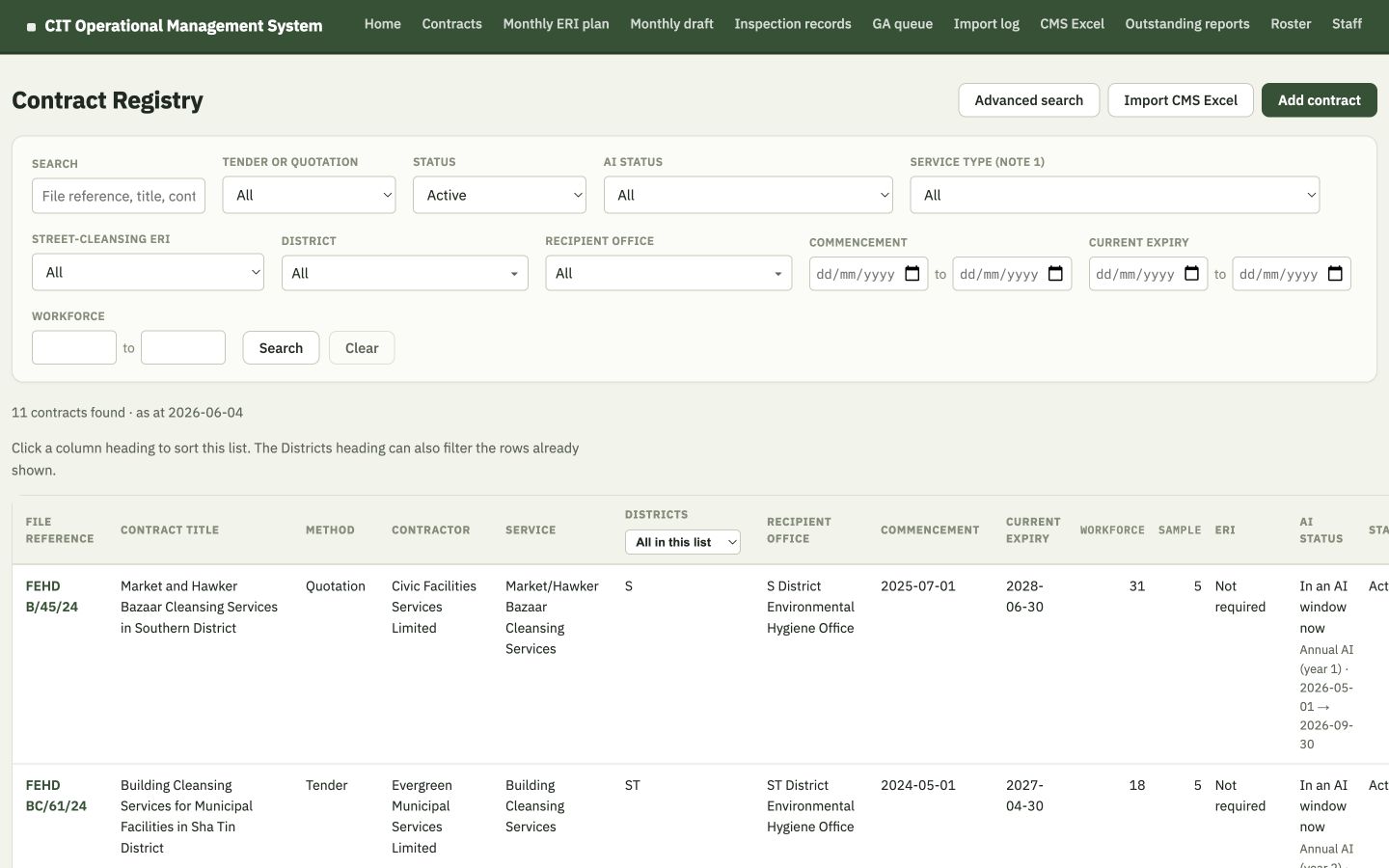
Fabricated Contract Registry with FEHD-style references and filters for status, AI status, service, district, dates and workforce
One list, with Tender/Quotation, status, AI status, service, district, office, dates and workforce filters.

Find the right record

Search by reference, title, contractor or service; filter by operational facts.

See derived information

Current status, sample size, ERI requirement and AI status are shown beside source facts.

Advanced Search: finds remaining visitable First, Annual and Final windows inside an enquiry period.

Current UI: Contract list, registry filters and advanced-search engine; temporary fabricated database.

Product tour · Contract detail

One contract page explains the record

Fabricated 46-month contract detail for FEHD S C/99/99 showing service, ERI status, dates, workforce, districts and source trail
FEHD S C/99/99: structured facts, ERI explanation, districts, office and “How this record got here.”

Visible logic

The ERI label explains why the contract is required and still outstanding.

Historical confidence

Extension history and source events can be inspected rather than inferred.

Multi-district remains structured

CW, E and Wch are separate relationships; the monthly visit district is chosen later.

Current UI: Contract detail and source-event sections; temporary fabricated database.

Product tour · Monthly ERI plan

The ERI screen supports a transparent monthly choice
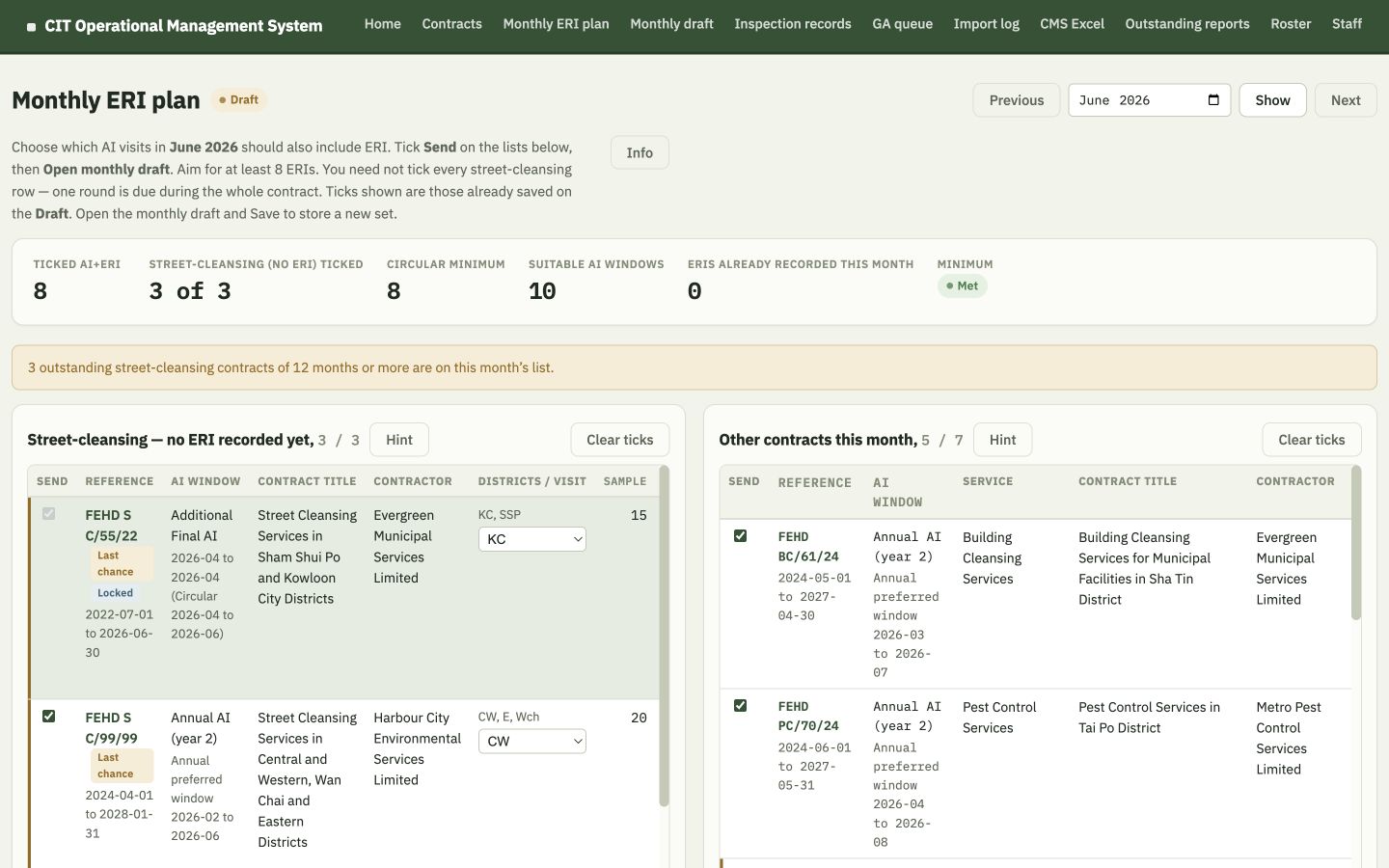
Fabricated Monthly ERI plan with FEHD-style references, street-cleansing and other-contract sections, eight selected ERIs and district choices
Section A and B, selection count, minimum indicator, locked last-full-month case, last-chance labels and visit-district choices.
Count, do not auto-tick

8 / 8 is visible; ordinary choices remain EO’s.

Lock only the safeguard

Last full month of term can force outstanding street-cleansing AI+ERI.

Choose the visit district

A bulk contract waits until one district is selected for this visit.

Current UI: ERI selection view and engine; temporary fabricated database.

Product tour · Roster

The roster makes half-day availability usable
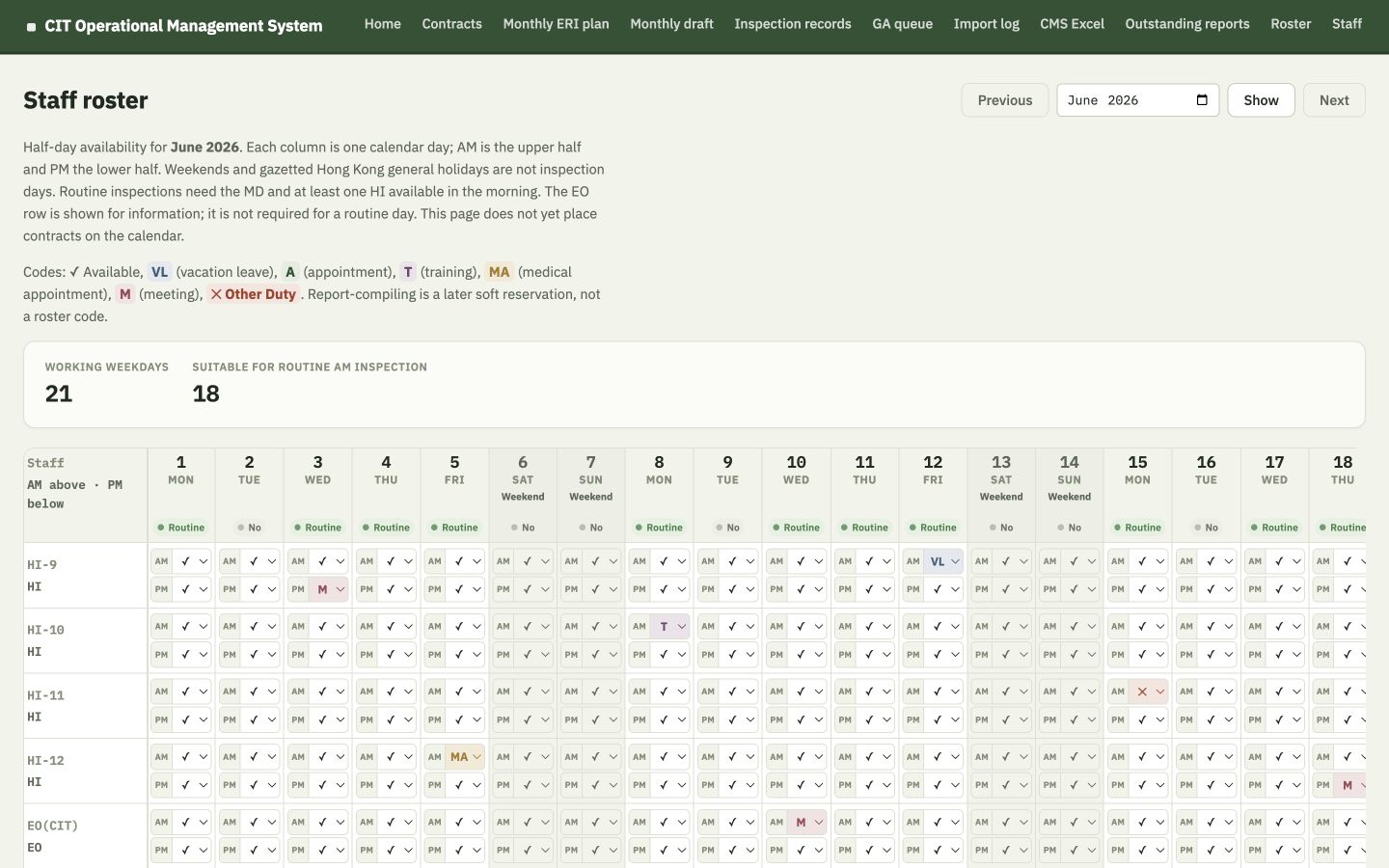
Fabricated monthly staff roster with AM and PM availability codes across June 2026
AM/PM codes, routine-day indicator and working-day totals in one monthly view.
From availability to scheduling: the monthly draft reads this roster. It does not require colleagues to copy the same availability into another planning sheet.

Current UI: Staff roster; fabricated availability pattern.

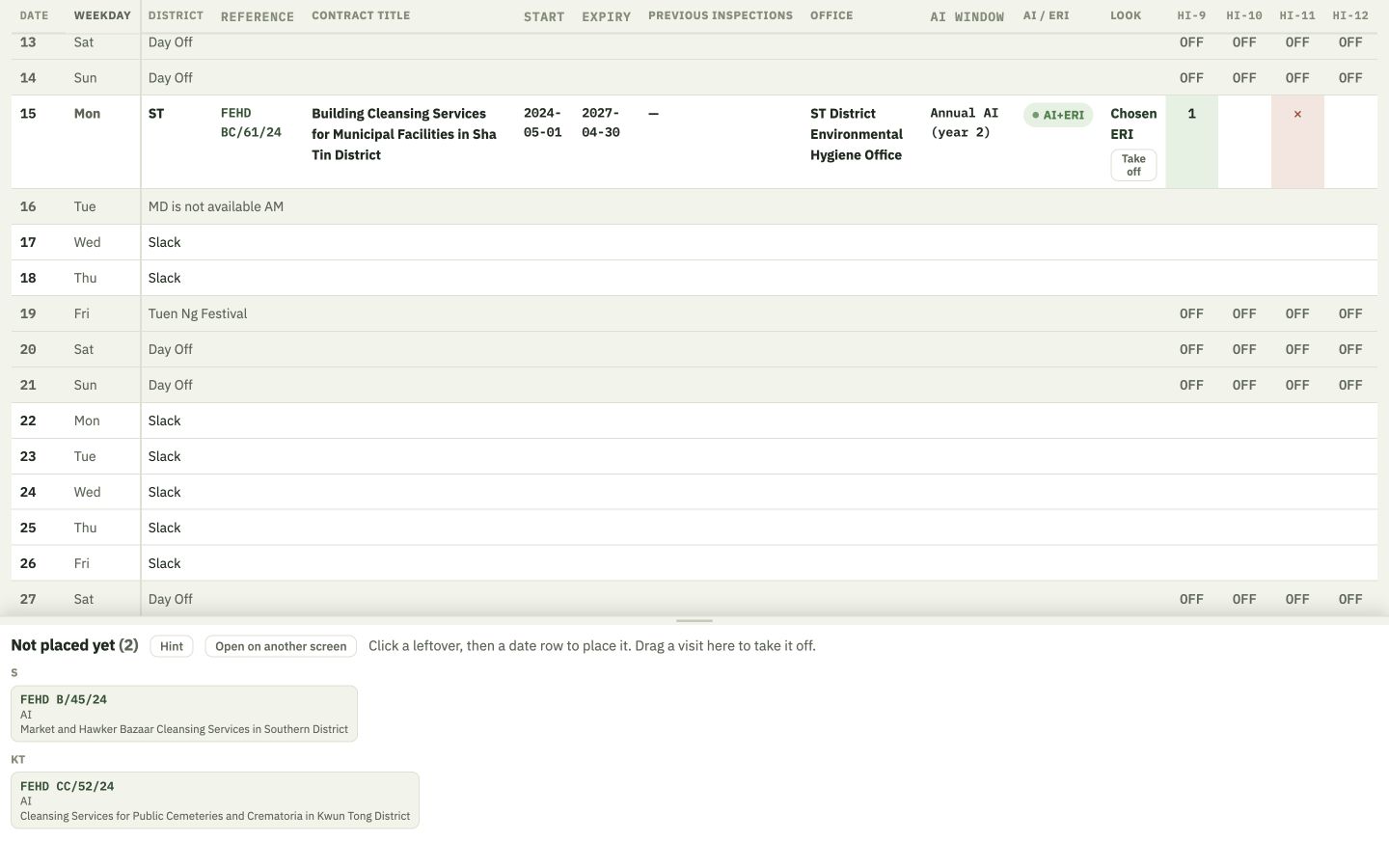
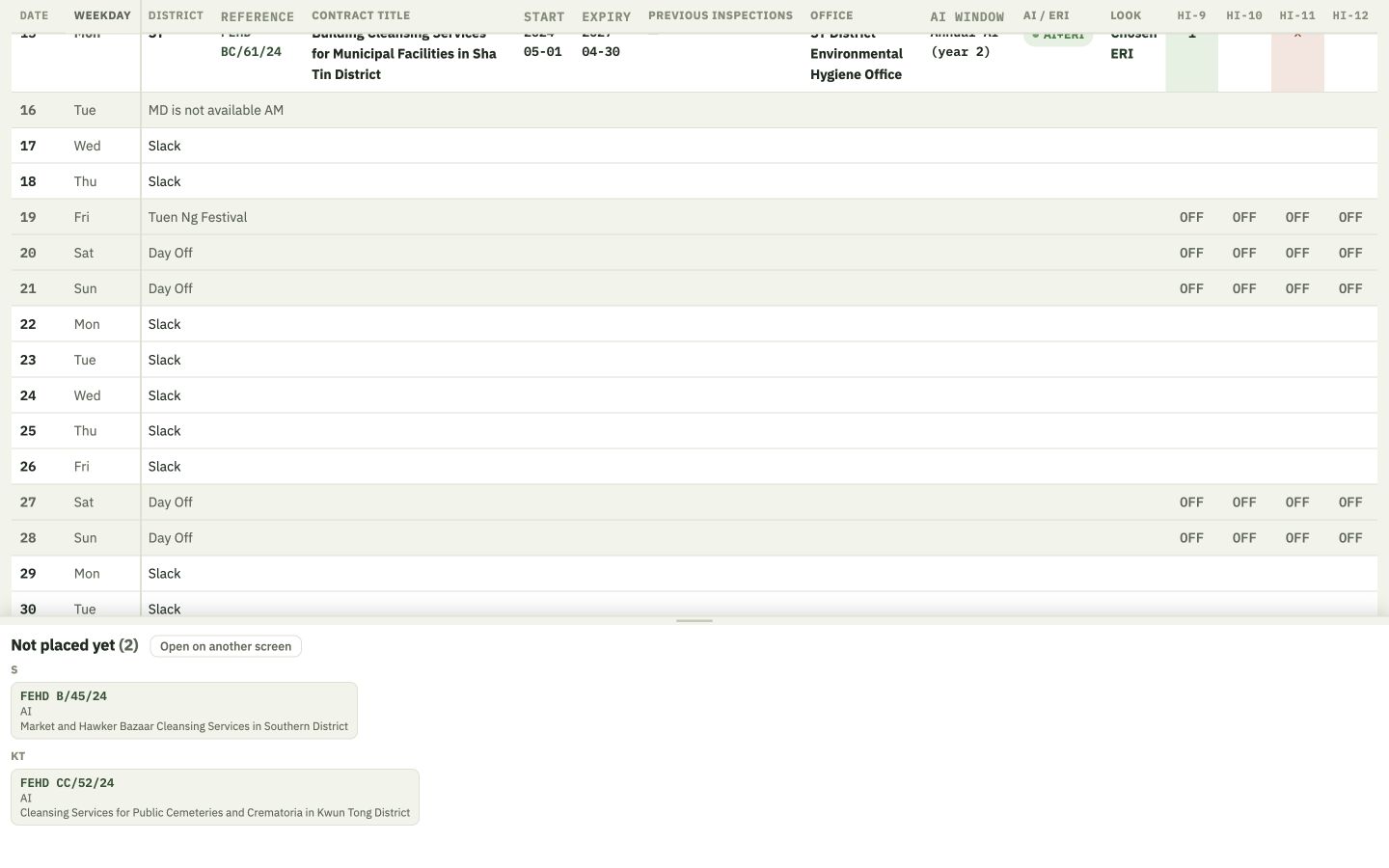
Product tour · Monthly draft

Scrolling reveals the working calendar—not only its warnings
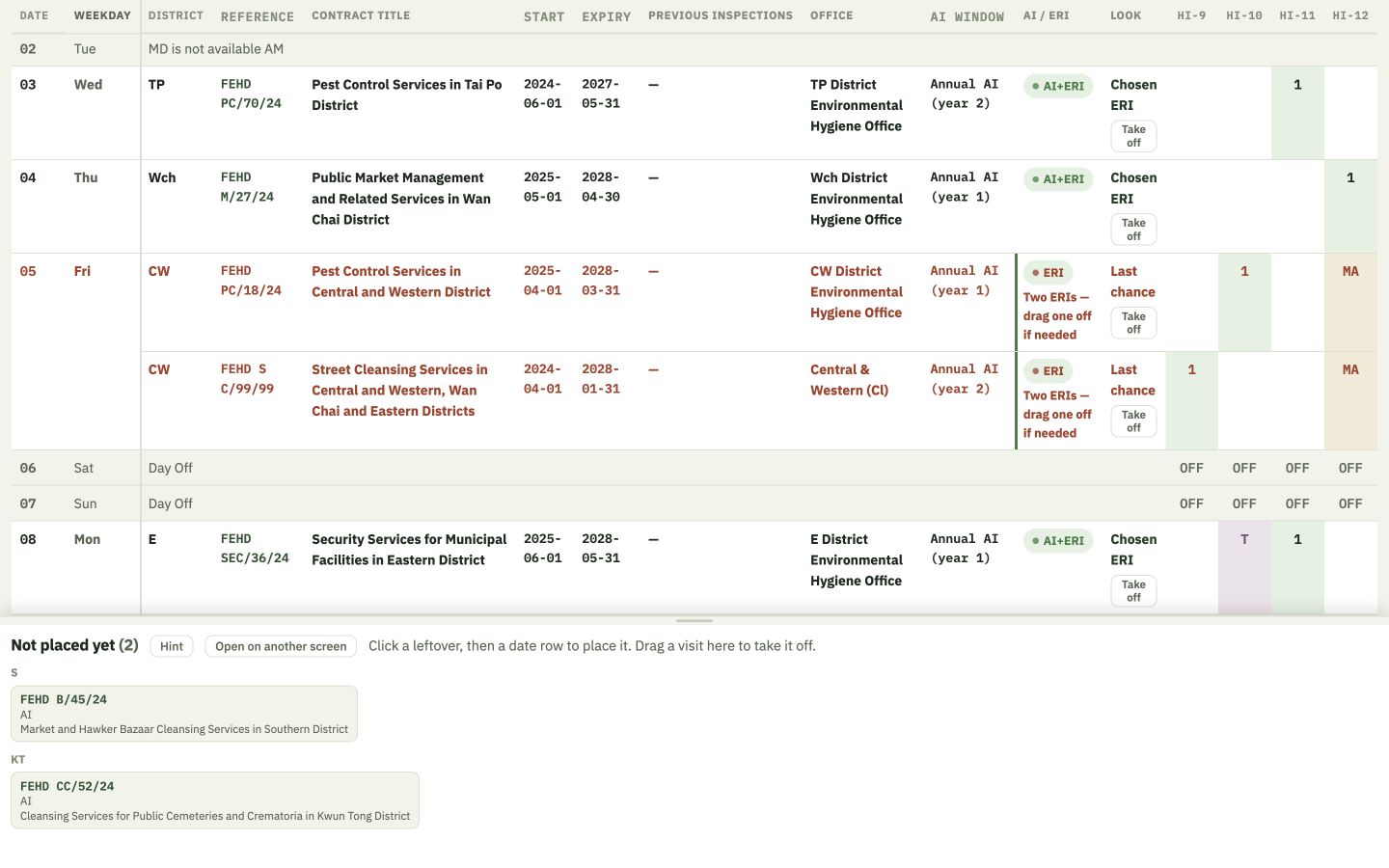
Fabricated Monthly Draft after scrolling to early June, showing dates 2 to 11, assigned visits, HI columns and the waiting tray
Scroll 1 · early month: daily rows, FEHD-style references, AI+ERI labels and HI assignments.
Fabricated Monthly Draft after scrolling farther down, showing dates 13 to 29 with working days, a public holiday, weekends and slack days
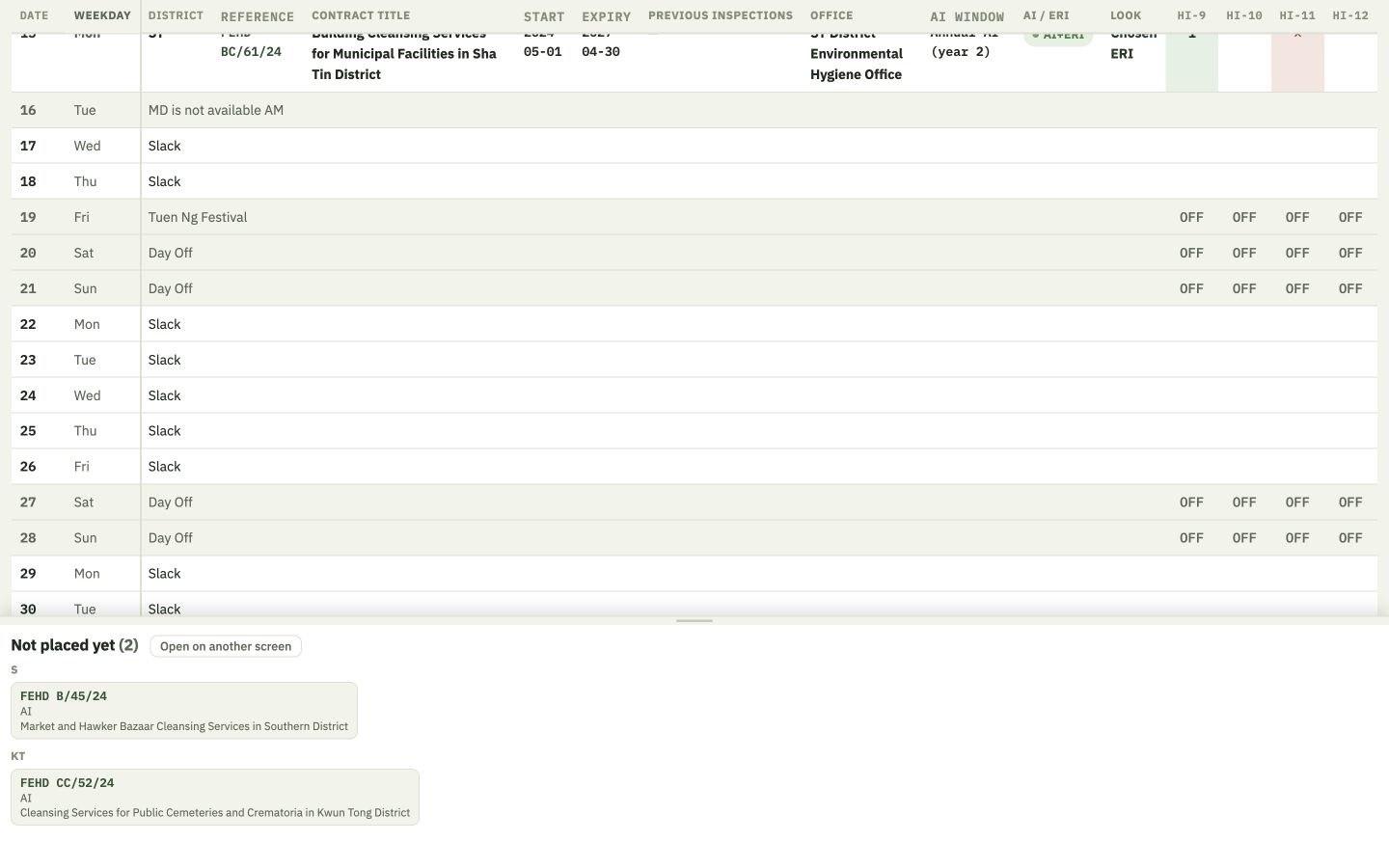
Scroll 2 · later month: working days, roster blocks, the public holiday, weekends and spare capacity.
8 placed · 2 waiting: the long vertical page keeps every weekday and every leftover visible. Click either screenshot to enlarge it.

Current UI: Monthly draft before Publish; two viewport captures taken after scrolling through a fabricated June 2026 month.

The monthly state change

Publish freezes intention; Inspection records capture fact

EditableDraftRecalculate · move · assign HI · take off · add · save
Publish →
Frozen planPublishedPlan stays fixed; no inspection history is written
Confirm →
Historical factConducted visitActual date · HI · ERI · audit month · irregularity
v1.2: a Published month can return to Draft while no conducted visit is linked. Stored visits remain, and editing tools return.
Safeguard: once any conducted visit is recorded against that plan, Unpublish is refused unless that record is removed first.

Source: Current milestone v1.2; Decisions D-046; monthly schedule and inspection-record engines.

Product tour · Published month

Published gives colleagues a stable plan
Fabricated Published monthly plan with an Unpublish button and frozen editing state
Published status, stable visits, Excel export and Unpublish while no conducted record is linked.

One agreed month

Colleagues can read the same frozen plan.

Export remains one-way

The system can produce the familiar office-style Excel schedule; it is not a two-way spreadsheet sync.

Warnings remain visible

Publishing does not erase known workload or waiting-list concerns.

Current UI: Published monthly draft before any visit is recorded; temporary fabricated database.

Product tour · Shared weekly view

Home shows the remaining week after Publish
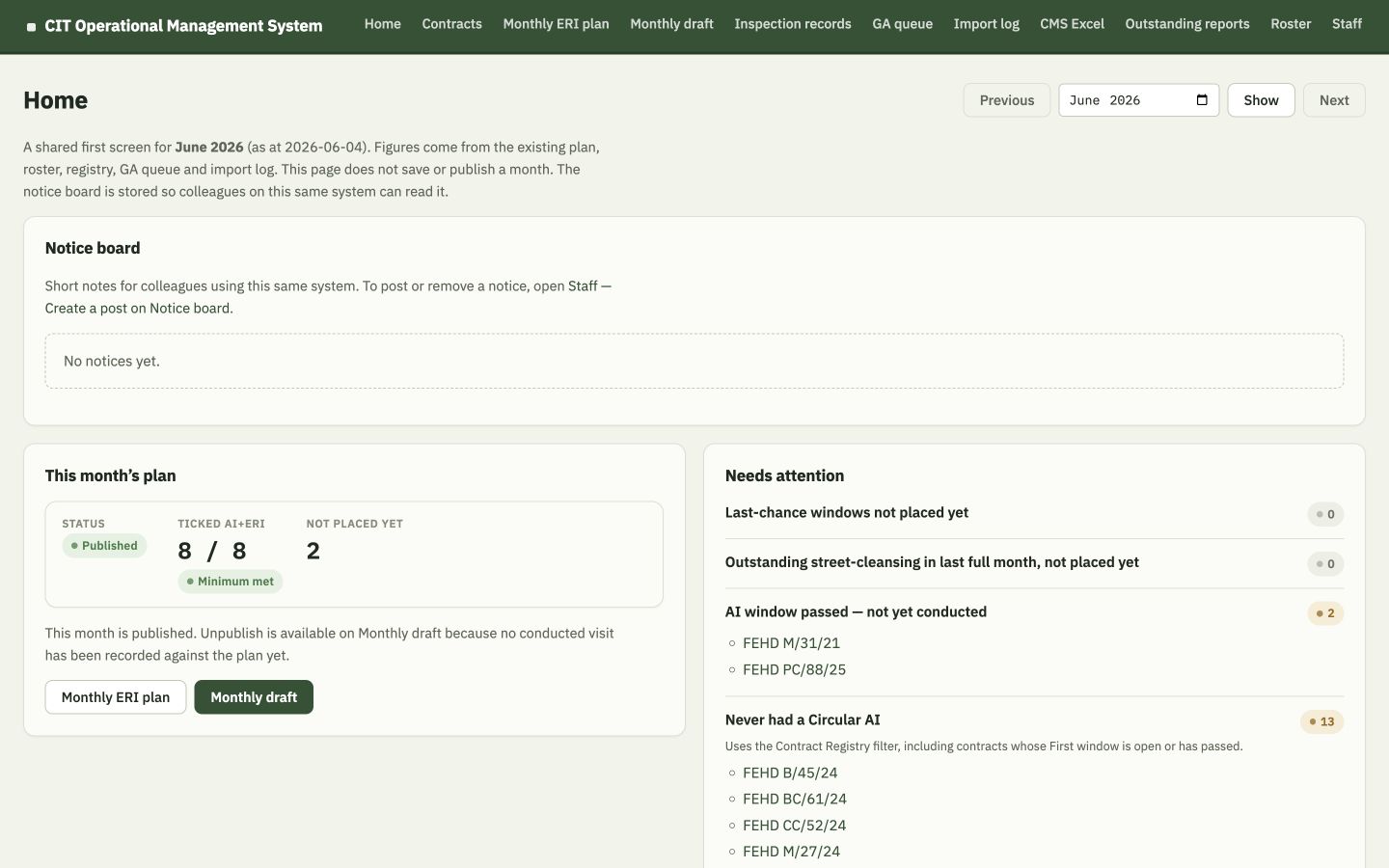
Fabricated Home screen showing remaining published visits for the week and roster capacity
Remaining visits from the as-at date through Sunday, beside remaining routine/working days.

Today-aware

Past planned visits are not presented as “remaining.”

Direct links

Contract, monthly plan and inspection record are one click away.

Shared clarity: a published plan becomes a useful daily starting point, not just a file stored in a folder.

Current UI: Home page for a Published fabricated month, as at 4 June 2026.

Product tour · Inspection records

Inspection records confirm what really happened
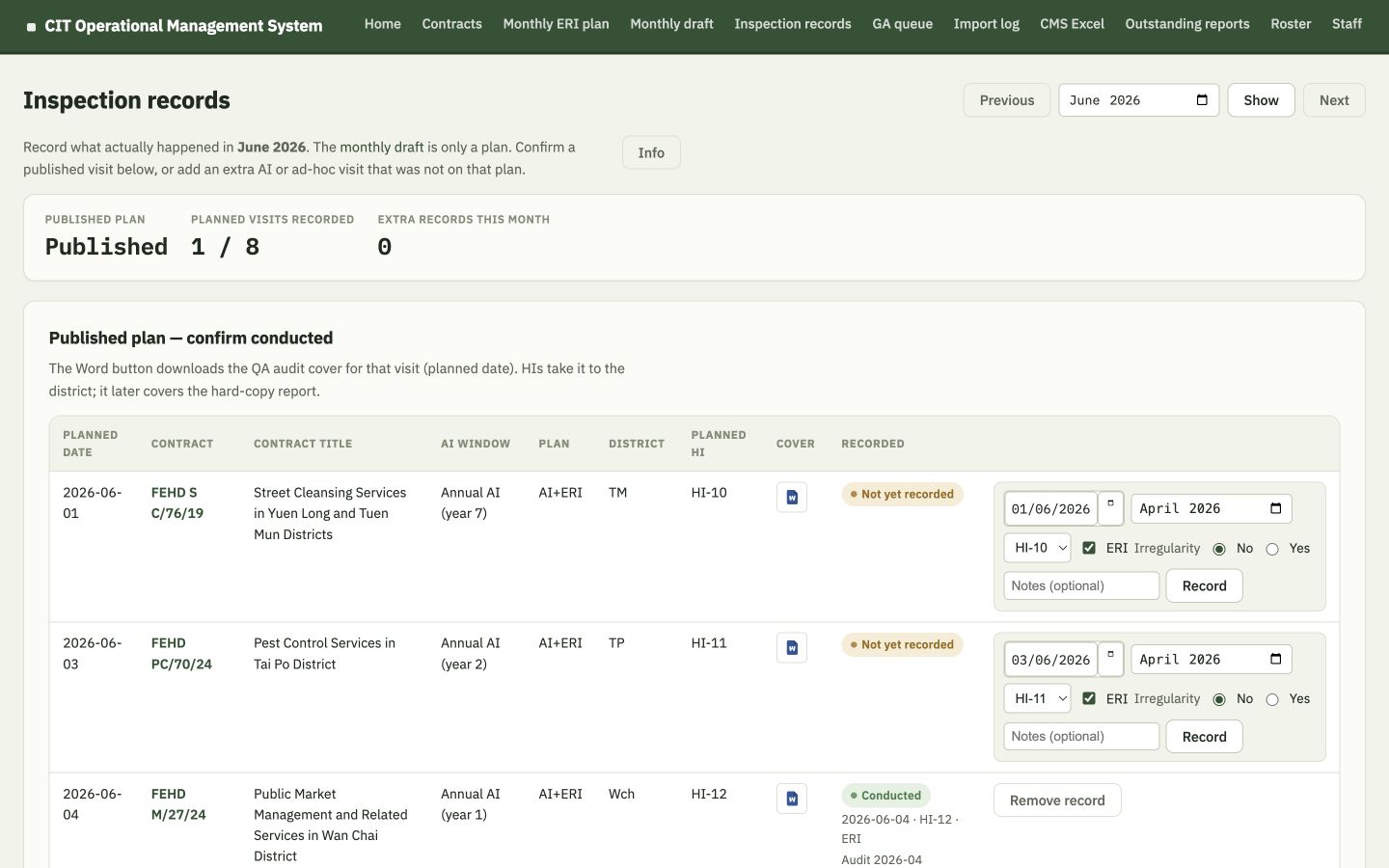
Fabricated Inspection records screen with one planned visit marked conducted and remaining visits awaiting confirmation
One visit is conducted; the others remain “Not yet recorded.” The plan itself did not change.
Actual date

Cannot be in the future.

HI & district

Stored against the physical visit.

Audit month

Required; defaults to two months earlier.

ERI & irregularity

Recorded as facts, with optional notes.

Current UI: Inspection records after one fabricated conducted visit.

Product tour · v1.2 safeguard

Once a conducted visit is linked, the month cannot be unpublished
Fabricated Published monthly plan showing Cannot unpublish because a conducted visit is already recorded
The system names the reason and directs the user to Inspection records.

The exact safeguard

Conducted fact takes precedence

A Published month can only reopen when no conducted record is linked to any of its plan rows.

Why it is fair

If the record was genuinely entered in error, remove that conducted record on Inspection records first; then Unpublish becomes available again.

Current UI: v1.2 Unpublish refusal after one fabricated visit was recorded.

06

Follow-through

Planning only helps if unfinished work remains visible.

GA, CMS Excel import review, outstanding reports and source trails turn the OMS from a calendar into an operational management system.

These modules each preserve a clear boundary between calculated support and professional review.

Product tour · Gratuity Auditing

GA is a separate, non-physical work queue
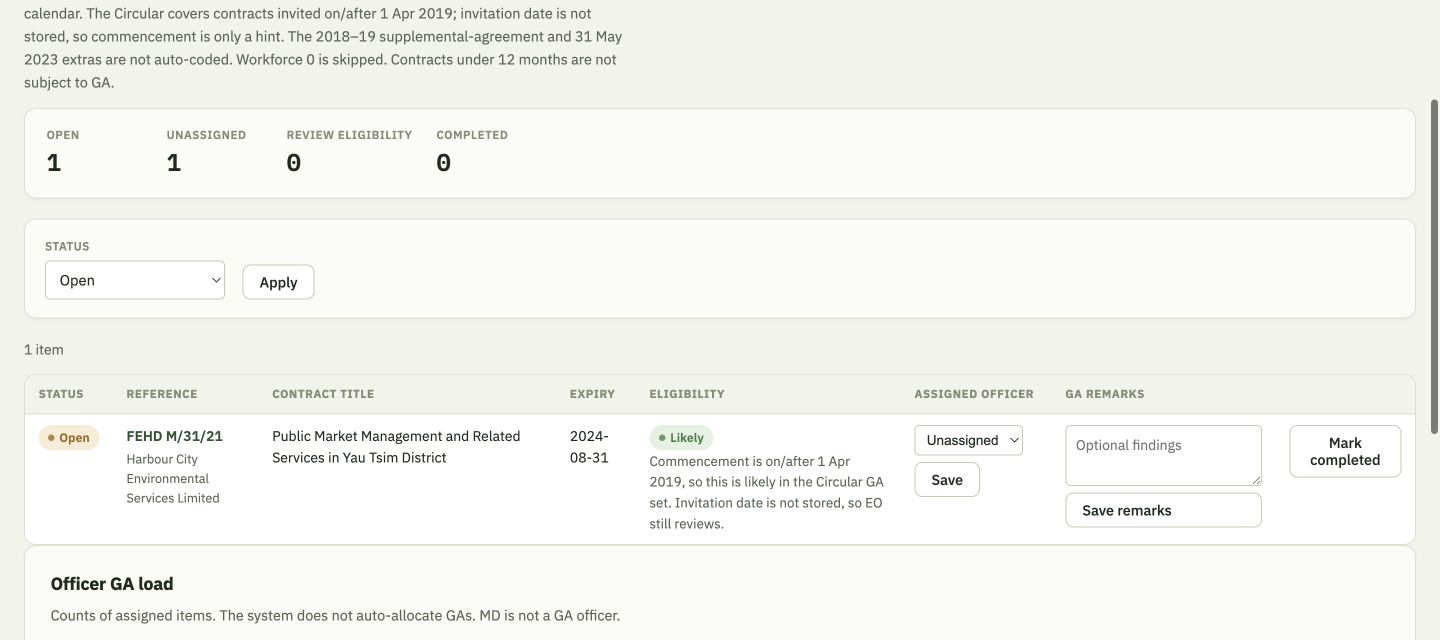
Fabricated GA queue showing open items, eligibility hints, officer assignment and completion controls
Expired eligible contracts enter an Open queue. GA work is assigned to HIs; EO(CIT) remains available only for administrative arrangement.

Assigned to HIs

GA is not a physical inspection and does not need the MD. EO(CIT) is available in the OMS only for administrative arrangement.

Eligibility is a hint

Invitation date is not stored. Commencement on/after 1 Apr 2019 is “likely”; older cases are flagged for EO review.

No false certainty: supplemental-agreement and 31 May 2023 Circular cases are not fully auto-coded.

Current UI: GA queue; source rules and known limitation shown directly on screen.

Product tour · CMS Excel

CMS Excel import is staged before it can change the registry
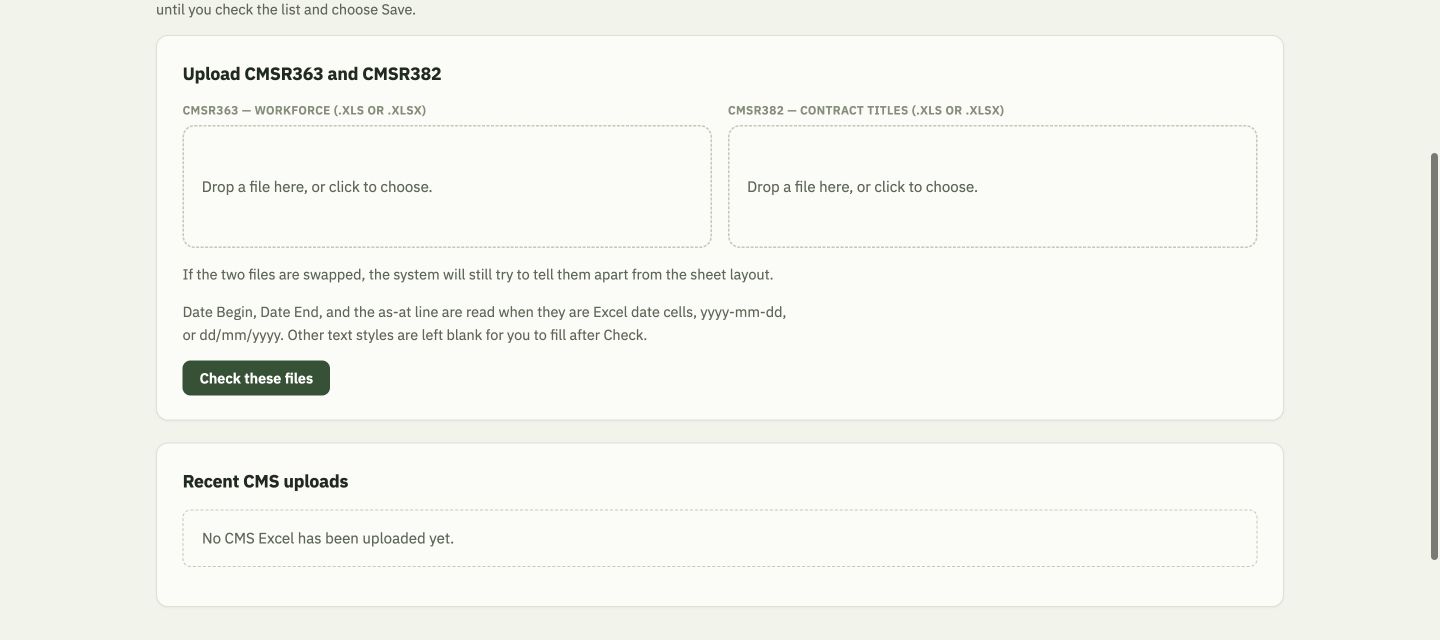
CMS Excel upload screen asking for CMSR363 workforce and CMSR382 contract title workbooks
Both monthly CMS Excel files are checked together; nothing writes to the registry before review and Apply.

CMSR363

Workforce, dates, districts and service facts.

CMSR382

Contract title / service description is the proposed title source.

Human review

Create, update, extend or skip—in card or spreadsheet layout.

Safe import discipline: unseen worker headings or changed layouts are refused for review, not guessed.

Current UI: CMS Excel upload screen; CMSR parse/import engine and Decisions D-075/D-093.

Product tour · Outstanding reports

Outstanding work becomes a live snapshot and a familiar workbook
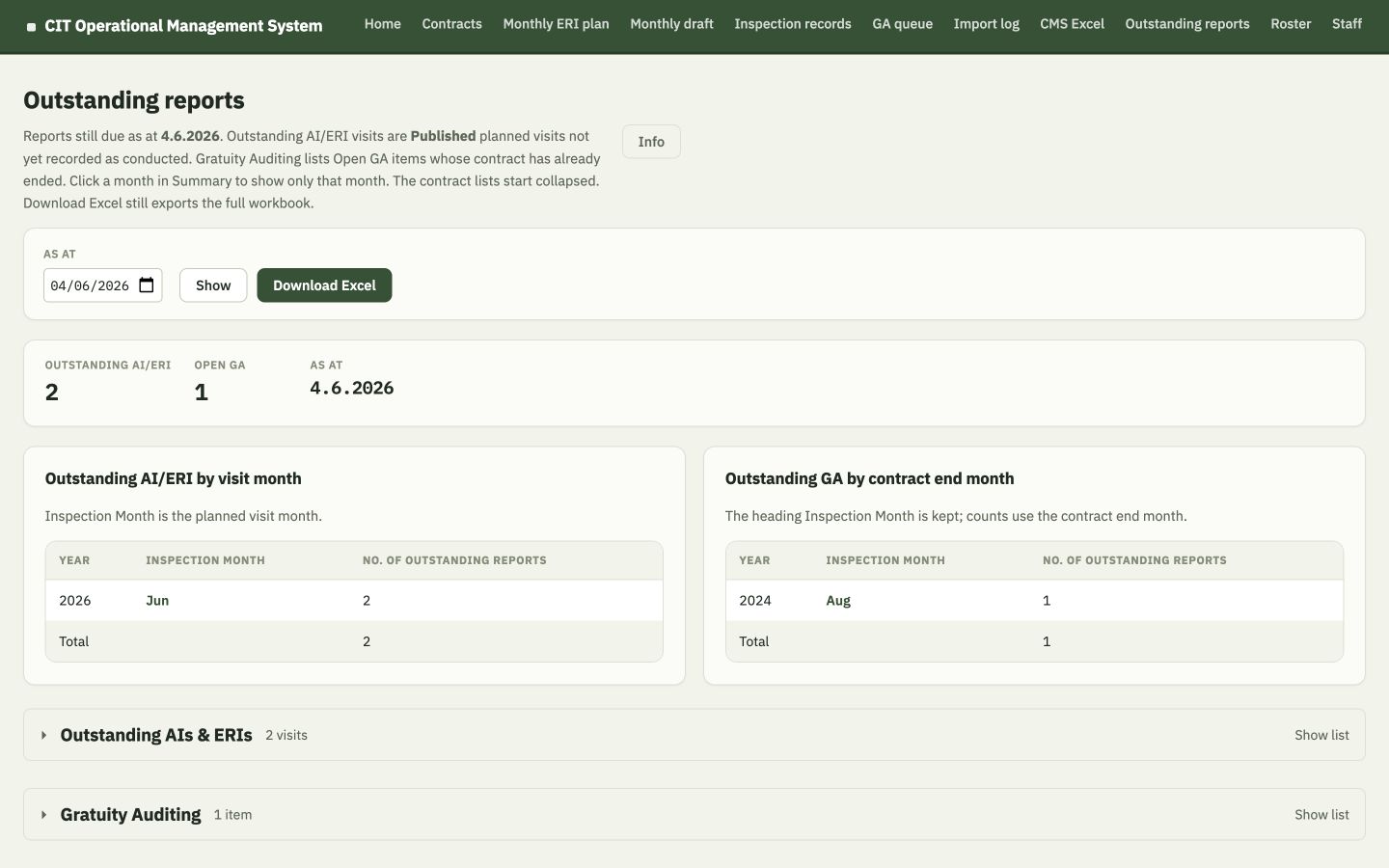
Fabricated Outstanding reports dashboard showing AI/ERI and GA counts by month
Same as-at snapshot feeds the live dashboard and a three-sheet Excel download.

Outstanding AI / ERI

Published planned visits due by the as-at date but not recorded as conducted.

Outstanding GA

Open GA items after contract expiry.

Excel continuity

Detail sheets plus Summary preserve the office reporting pattern.

One definition: the dashboard and Excel download are built from the same collected snapshot.

Current UI: Outstanding Reports dashboard and export engine; fabricated as-at 4 June 2026.

Digital core, familiar outputs

The OMS still produces familiar office documents

Monthly schedule

Excel export

Calendar rows, district-day visits, HI marks, sample sizes, conducted history, workload points and a waiting sheet.

Field preparation

QA audit cover in Word

Available only for a Published planned visit, using the planned date and contract/staff details.

Management reporting

Outstanding workbook

Outstanding AI & ERI, Gratuity Auditing and Summary sheets, using the chosen as-at date.

The goal is not to remove every spreadsheet or document. It is to make them outputs from one structured source, so they no longer need to be the place where every rule and relationship lives.

Source: Schedule export, QA audit cover and Outstanding Reports engines; acceptance tests.

07

Adoption and safeguards

Start small, keep the data local, and be honest about the controls still needed.

The current architecture supports a practical single-PC or controlled LAN pilot. It is not yet a production identity-and-permissions platform.

Deployment choice should be made with office and IT colleagues together.

Deployment choices

Two practical pilot shapes

Option A · simplest

Single nominated office PC

  • Application and SQLite file stay on the same PC.
  • One colleague opens the system in a browser on that PC.
  • Portable office package can reduce installation friction.
  • Backup is a controlled copy of the database while the app is stopped.

Best for: first UAT and a tightly controlled operational trial.

Option B · controlled pilot

One host PC, several office browsers

  • Application and database still live on one host PC.
  • Other approved office PCs connect through the local network in Chrome.
  • The database file is never put on a shared network drive.
  • IT input may be needed for firewall, host stability and backup.

Important: the current build has no named sign-in or role-based permissions.

Do not call the LAN option “fully collaborative production deployment.” Anyone who can reach the pilot address can currently change records.

Source: System Architecture; README; office-PC guidance; Decisions on optional LAN trial.

A truthful security message

Local data is helpful—but not the same as guaranteed security

Current design choiceWhat it helps withWhat still needs control
Local SQLite databaseNo cloud service is required for the prototype.Device access, disk protection, physical security and approved storage location.
Application-only database accessBrowsers cannot directly open or edit the database file.Named authentication and role permissions are not in the current build.
Structured migrationsSchema changes are versioned; normal upgrades do not rely on deleting data.Release, rollback and backup procedures still require operational ownership.
Privacy disciplineReal workbooks and personal ERI questionnaire data are excluded from the repository.Pilot data handling must follow departmental policies and least-access principles.
Backup habit: stop the app, confirm database write-ahead files are settled, then copy the SQLite file to an approved backup location.
Avoid: placing the live SQLite file on a shared network drive or treating “local” as “100% secure.”

Source: Privacy/source-data rules; Architecture; database connection safeguards; README backup guidance.

Scope discipline

What is in the current build—and what is deliberately later

Current build

Registry foundation + operational planning chain

  • Contract create/update/view, filters, districts, offices and extensions.
  • AI windows, sample size, ERI coverage and monthly selection.
  • Roster, explainable monthly Draft, Save, Publish and v1.2 Unpublish.
  • Inspection records and QA audit cover.
  • GA queue, CMS Excel import review, source trail, advanced search and reports.
  • Excel/Word outputs and reproducible fabricated seed data.

Deliberately later / out of current scope

Do not imply these are already delivered

  • Constraint solver or opaque autonomous scheduler.
  • Full complaints, DN/DP, warning-letter or prosecution workflows.
  • Full ERI questionnaire digitisation and personal questionnaire data.
  • Two-way Excel synchronisation.
  • Production named accounts, role permissions and full audit history.
  • Amended/schedule-change history or writing inspection rows on Publish.
  • Full multi-district round planning in one requirement.

Source: MVP Scope; current milestone; Project Charter and Decisions Log.

Verified in this review

There is meaningful engineering evidence—but it is not a production certificate

36test files
428tests passed
0test failures
TypeScript typecheck

Business rules

AI windows, 12-month boundary, workforce 0/blank, ERI locking/ranking and GA.

Workflow states

Draft, Publish, Unpublish, movement, HI reassignment and conducted-record safeguards.

Data & outputs

Migrations, imports, filters, schedule Excel, covers and outstanding reports.

What this proves: the checked build is internally consistent against its automated rule suite. What it does not prove: production security, operational sign-off, perfect source data or acceptance by every user.

Verification run: npm test -- --reporter=dot and npm run typecheck, 20 August 2026.

Implementation & adoption

A sensible path from working prototype to dependable office use

1

Agree the rules

Resolve policy ambiguities, record decisions and confirm the source-of-truth documents.

2

Prepare data

Use local authoritative workbooks, review exceptions and never silently guess unresolved tokens.

3

Office UAT

Run representative months with EO, HIs and MD; compare against the current schedule and reports.

4

Controlled pilot

Choose single-PC or LAN shape, define backup, ownership, access and support.

5

Review evidence

Measure data quality, missed-window visibility, time saved and user confidence before wider use.

Adoption principle: keep the familiar office outputs, teach one workflow at a time, and let users see why the system reached each proposal.

Source: Migration Plan; Acceptance Tests; Architecture; office-PC guidance; ambiguity protocol.

08

Management decision

The next step is not “buy software.” It is “agree how to pilot a shared operational truth.”

The working build already demonstrates the concept. The management task is to sponsor safe adoption, validate policy and set clear ownership.

A focused pilot can be evaluated without committing to every future module.

The practical ask

What we are asking management and colleagues to support

1

Confirm the current scope

Registry, AI/ERI planning, roster, monthly plan, conducted visits, GA, imports and reports—without expanding into every later workflow.

2

Nominate operational owners

EO rule owner, data steward, representative HIs/MD for UAT, and a clear route for policy decisions.

3

Choose the pilot shape

Single nominated PC first, or a controlled LAN pilot with IT agreement on host, firewall and backup.

4

Approve a measured UAT

Use fabricated and approved local data; compare obligation lists, monthly schedules, conducted records and outputs.

5

Set success measures

Fewer missed windows, faster reconciliation, clearer handover, explainable workload and reliable outstanding reports.

6

Keep limitations visible

No production security claim, no opaque autonomy, no silent policy invention and no private source files in the repository.

Recommended decision: endorse a controlled, evidence-led office pilot within the documented current scope.

Closing thought

One clear picture.
Better-timed work.

CIT OMS is not valuable because it is “software.” It is valuable because it makes obligations, decisions and facts easier to see, explain and carry forward together.

Clarity

Know what is due and why.

Control

EO reviews and owns the month.

Continuity

History survives staff and spreadsheet changes.

Thank you. The continuous Briefing mode contains the detailed notes, caveats and source references for follow-up reading.

A

Appendix

Definitions, safeguards and source trail.

Use these pages for questions after the main pitch.

The appendix intentionally contains more detail than a meeting-room presentation normally would.

Appendix

Plain-language glossary

TermMeaning in this system
AIAudit Inspection under the Circular. A physical visit when recorded as conducted.
ERIEmployee Rights Interview component carried out with a suitable AI; never a standalone visit.
GAGratuity Auditing after eligible contract expiry; a non-physical work queue.
RequirementA calculated obligation window such as First, Annual, Final or Additional Final.
DraftAn editable monthly plan that can be recalculated and adjusted.
PublishedA frozen plan. It still does not say the visit happened.
Conducted factA confirmed inspection record with actual date and operational details.
Last chanceThe final month in which a currently visitable window should be planned.
Locked AI+ERIOutstanding eligible street-cleansing in the last full calendar month of term.
Not placed yetA visible waiting item the current draft could not or should not place automatically.

Source: Source-of-truth rule documents and current UI labels.

Appendix

Rule reference at a glance

TopicCurrent ruleHuman control / caveat
Under 12 monthsFirst AI only; no Annual, Final, ERI or GA.Exact boundary is the calendar anniversary.
Workforce 0No AI, ERI or GA; keep registry record.Blank is not zero and stays eligible.
First AICircular 3 months; February 4; office prefers months 2–3.Final choice remains operational.
Annual AIPreferred ±2 calendar months around anniversary.Overlapped Final is stored but not separately visitable.
Final AIThree months ending expiry; prefer first month.Extension may create Additional Final.
ERI minimumCount and warn at 8 per month.No ordinary auto-ticking.
Street-cleansing ERIOne round over eligible term; lock in last full month if still outstanding.EO chooses earlier suitable month.
Routine dayWeekday, not holiday, MD AM and ≥1 HI AM.EO may manually place and receive warnings.
PublishFreeze plan only.Warn-and-allow last-chance leftovers.
UnpublishReturn Published to Draft and retain visits.Refused after a linked conducted visit exists.

Source: AI, ERI, Roster and Monthly Scheduling source-of-truth documents; Decisions Log.

Appendix · Provenance

What was studied and how claims were checked

Repository source of truth

Project Charter; Current Workflow; System Architecture; Data Model; AI, ERI, Roster and Monthly Scheduling rules; MVP Scope; Migration Plan; Acceptance Tests; Decisions Log.

Operational reference material

QAS Circular 1/2019 (Dec 2025 version); CIT Schedule; Tender Master; Quotations; CMSR reference layouts; planning conversation archive as historical context only.

Implementation

Migrations 001–021; domain engines; application routes; views; browser scripts; exports; startup and database safeguards; 36 automated test files.

Attached implementation plan

Treated as a pitching source—not as an instruction file. Its portfolio figures were reconciled to read-only database aggregates. Its design ambition informed this presentation.

Claims that were qualified

  • “Guarantees compliance” → supports compliance assurance and warns.
  • “100% privacy/security” → local-first, with access/backup controls still required.
  • “Fully collaborative” → optional LAN pilot, currently without named authentication.
  • “All workflows” → current documented scope only.
Visual privacy: all product screenshots in this briefing were made from a temporary fabricated database using realistic but invented FEHD-style examples. No real contractor names, contract references or questionnaire data are embedded.

Review date: 20 August 2026 · Snapshot date for portfolio figures: 1 August 2026.